
Deposit checks with Chase QuickDeposit℠

Use the Chase Mobile® app wherever you are to easily deposit checks

Fast
Open the Chase Mobile® app on your mobile phone or tablet to deposit your checks and access your funds quickly.

Convenient
Save a trip to the branch and deposit checks on your schedule, anytime and anywhere.

Secure
Deposit checks securely. We help protect your information by not storing passwords or check deposit data and images on your mobile device.
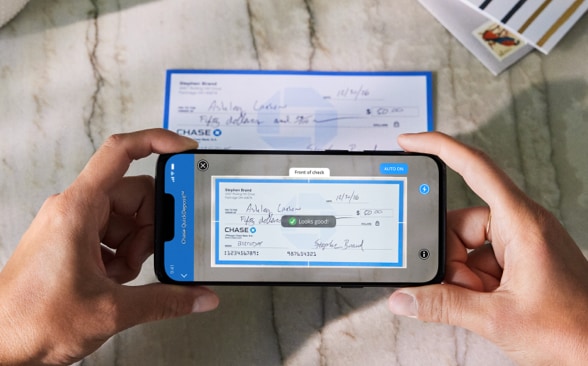
Here’s how to deposit checks
Sign in: Open the Chase Mobile® app and choose “Deposit checks” in the top navigation menu.
Take pictures: Follow the instructions to select the account you want to deposit the check into, enter the deposit amount and take a picture of both the front and back of the endorsed check.
Submit: Confirm that all the details are correct, hit “Deposit,” and you’re done.
We recommend keeping the check until you receive our notification that your Chase QuickDeposit℠ has been accepted.
Pay bills securely from anywhere
Simplify your bill paying with Chase Online℠ Bill Pay. You can pay anyone securely, including utilities, credit cards and even your landscaper. Set up one-time or repeating payments and do it without checks or stamps.

Frequently Asked Questions
Answers to the most common questions
In the Chase Mobile® app, choose “Deposit Checks” in the navigation menu and select the account. Enter the amount of the check and tap “Front.” With our “Auto Capture” feature, the picture of the front and back of the endorsed check will be captured — or you can choose to take the pictures manually. Verify your information and submit your deposit. After you submit, you can deposit another check or view the receipt. You’ll get an email when your deposit is received — and another when it’s accepted. If the deposit is rejected, you’ll also get an emailed explanation. Remember to properly endorse the back of the check with your signature and “For electronic deposit only at Chase.”
Deposits to checking or savings accounts submitted before 11 PM Eastern time on a business day generally will be available by the next business day. Deposits submitted after 11 PM or on a non-business day will be processed the next business day. However, we may delay availability if we require further review of the deposit. Any information about delayed availability will be provided in an email to the email address on file.
After you complete your transaction, write “deposited” and the date of deposit on the face of the check. Please retain the marked check for two business days or until you receive our notification that your Chase QuickDeposit has been accepted. After that time, you may destroy it.